Troubleshooting Dashboards
If something isn’t working as expected, this topic walks you through common causes and solutions to get things back on track.
"I can't create any custom dashboards because I can't access the Admin section in EPASS Reports"
Due to screen resolution requirements, custom dashboards can only be created on a PC. Tablets and mobile devices are currently not supported.
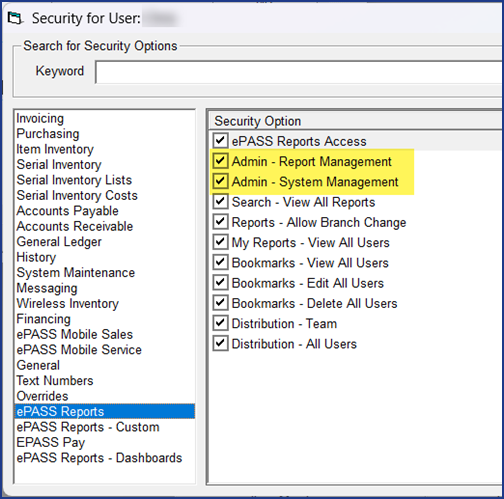
If you are using a PC, and still can't access the Admin section, verify that your screen is set to a minimum 1920x1080 resolution and that your EPASS User account has the Admin - Report Management and Admin - System Management security options.
"I keep getting an error when I'm trying to create a new dashboard"

EPASS database tables that are locked for editing might prevent you from creating a new dashboard. If you are receiving an error when trying to create your dashboard, verify that other EPASS Users aren't currently logged in and editing EPASS table data.
Once the tables are unlocked, you will be able to add your new dashboard.
"My dashboard Widgets are really slow loading data"
Because each Widget requires system resources to load, having too many can slow down the application’s overall performance.
You can try the following to increase dashboard performance:
- Limit the number of Widgets on each dashboard.
- Reduce the amount of data that each Widget needs to process by adjusting the data filters to show a limited data set. For example, instead of having the Ship By Brand Widget show shipping data for all brands over an entire year, adjust the data filter to only show major brands shipped over the last quarter.
"I can't see some of the Widgets or groups in the Widget menu on the Dashboard Editor"
Verify that the Widgets you are expecting to see haven't been disabled in Widget Management. (See Organizing Your Widgets.)
Verify that you have the security options to view specific Widget Groups. (See Controlling Widget Group Access.)